What Was Happening
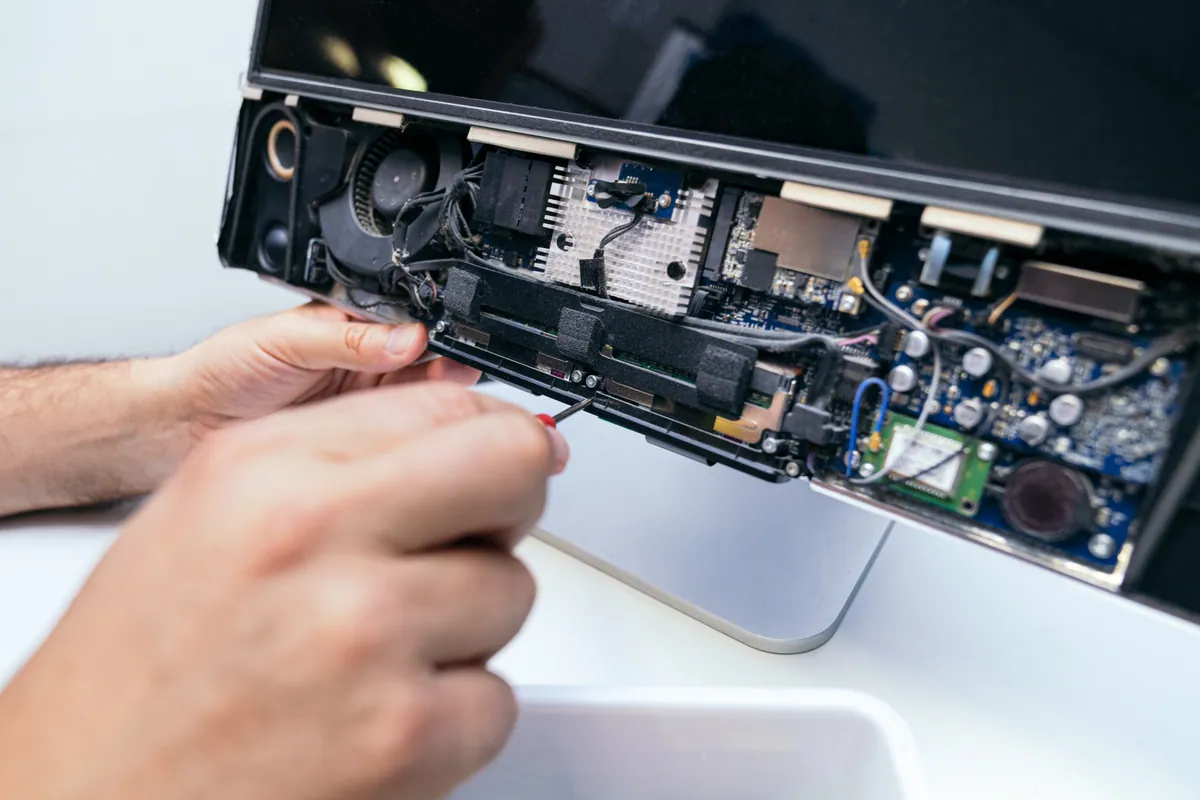
A customer in Putney SW15 brought in an HP all-in-one that had stopped booting into Windows.
The distinction mattered from the outset. The machine wasn’t dead — it powered up, the screen lit, the fans ran, and it reached the HP splash screen. It simply never got to Windows. For anyone using it, that’s just as unusable as a machine that won’t switch on, but from a repair point of view it’s a completely different starting position and a far more hopeful one.
There had been a power event at the property beforehand. That detail turned out to be the key to the whole job, and it’s the kind of thing customers often mention almost in passing without realising it’s the most useful thing they’ve told us.
Sound like your problem?
Bring it to our Putney workshop or message us a photo and we will give you a straight answer and a quote before any work starts.
Our Diagnosis
When a PC powers on but never reaches the operating system, the fault sits in a fairly narrow window: the firmware has run, and the handover to the boot drive has failed. So the question becomes whether the drive has died, the Windows installation has been damaged, or the firmware simply isn’t being told to boot correctly any more.
Working through it in that order — cheapest and most reversible first — we found the boot configuration in the machine’s firmware had been disturbed. The secure boot setting was stopping the machine from starting.
Secure boot is a firmware feature that checks the software loading at start-up is properly signed before it’s allowed to run. It’s a sensible security measure and normally invisible. But it depends on stored settings and stored keys, and if that stored configuration is disturbed or the boot files it’s checking have been altered, the result is a machine that refuses to proceed — exactly what we were looking at.
That tied directly back to the power surge. A surge doesn’t have to physically destroy anything to cause this; corrupting the small amount of settings storage the firmware relies on is enough. The computer is electrically fine and simply can’t start.
Adjusting the setting got the machine booting, which confirmed the diagnosis. But it also exposed the second problem: the Windows installation itself had been damaged by the same ungraceful shutdown and needed attention before the machine could be called fixed.
How We Fixed It
We changed the boot configuration in the BIOS so the machine would start, and saved the settings.
With it booting, we repaired the Windows installation in place rather than wiping and reinstalling. That distinction is worth spelling out, because “not booting into Windows” is very often quoted as a full reinstall. A repair keeps the customer’s files, their installed applications and their settings; a reinstall means restoring or re-creating all of it. Where a repair will hold, it’s the better outcome by a wide margin, and it’s what we attempt first.
The repair held, and the machine started reliably through repeated restarts from cold.
There was one finding we couldn’t fix and had to be honest about. The firmware was not reliably retaining its saved settings. We saved the configuration, and it worked — but a machine that has to be told its boot settings more than once is telling you its settings storage isn’t holding, typically because the small battery that maintains it is failing or the surge did lasting damage to that part of the board.
So we handed it back working, with a plain explanation: if it ever fails to boot again, the setting may need changing manually rather than the machine being faulty in some new way. That’s less tidy than claiming a complete fix, but it’s what was true, and it means the customer knows what they’re looking at rather than assuming the repair failed.
The Result
The all-in-one went home booting normally, with the customer’s data, applications and settings intact — no reinstall, no restore from backup, no reconfiguring.
The caveat about the firmware settings went with it. If the problem recurs, the customer knows what it is and that it’s a known limitation rather than a fresh fault.
Why This Happens
Power surges are more common than most people assume, and the damage they do is often misunderstood. The dramatic version — a dead power supply, a burnt smell, a machine that will never switch on again — is the one people expect. The quieter version is far more frequent: a machine that survives electrically but comes back with corrupted settings or a damaged operating system, because it was cut off mid-operation rather than shut down properly.
An operating system is writing to disk constantly, and cutting power without warning while it’s mid-write is how boot files get damaged. That’s the same mechanism behind the more familiar problem of a machine that won’t start properly after a power cut. Firmware settings storage is vulnerable in a similar way, and it’s backed by a small battery that keeps the configuration alive when the machine is unplugged. Once that battery weakens — and after a decade or so of a machine’s life it will — settings stop being retained, which produces exactly the sort of intermittent boot behaviour we saw.
Secure boot deserves a word too, because it causes a disproportionate share of “won’t boot” cases relative to how little most people know about it. It’s on by default on modern machines and is genuinely worth having. It also means the boot process is now conditional in a way it wasn’t twenty years ago: the firmware checks before it commits. When the check fails, the machine stops. That’s the feature working as designed, even though it presents to the user as a fault.
The practical protection is unglamorous but effective. A surge-protected extension lead is inexpensive and takes the worst edge off; for a desktop holding anything important, a small battery backup unit will keep it running long enough to shut down properly during a cut, which is where most of this damage actually originates. And regardless of hardware, a current backup turns “won’t boot” from a crisis into an inconvenience.
Local Help in Putney SW15
If a desktop or all-in-one is powering on but never reaching Windows, don’t assume the worst — a good proportion of these are configuration or operating-system problems rather than failed hardware, and many are recoverable with everything intact. We’ll always try the repair that keeps your data before we suggest the one that doesn’t.
Our workshop is on Lower Richmond Road in Putney, so it’s a short trip for anyone local. Call 020 7610 0500 or book in for PC repair in Putney — and do mention any recent power cuts or surges, because it genuinely narrows things down.